Intermittent fasting · food log · one screen
Your fasting timer and food log, on one screen.
Start a fast, log what you eat when your window opens, and see both on the same daily screen — without running a second app.
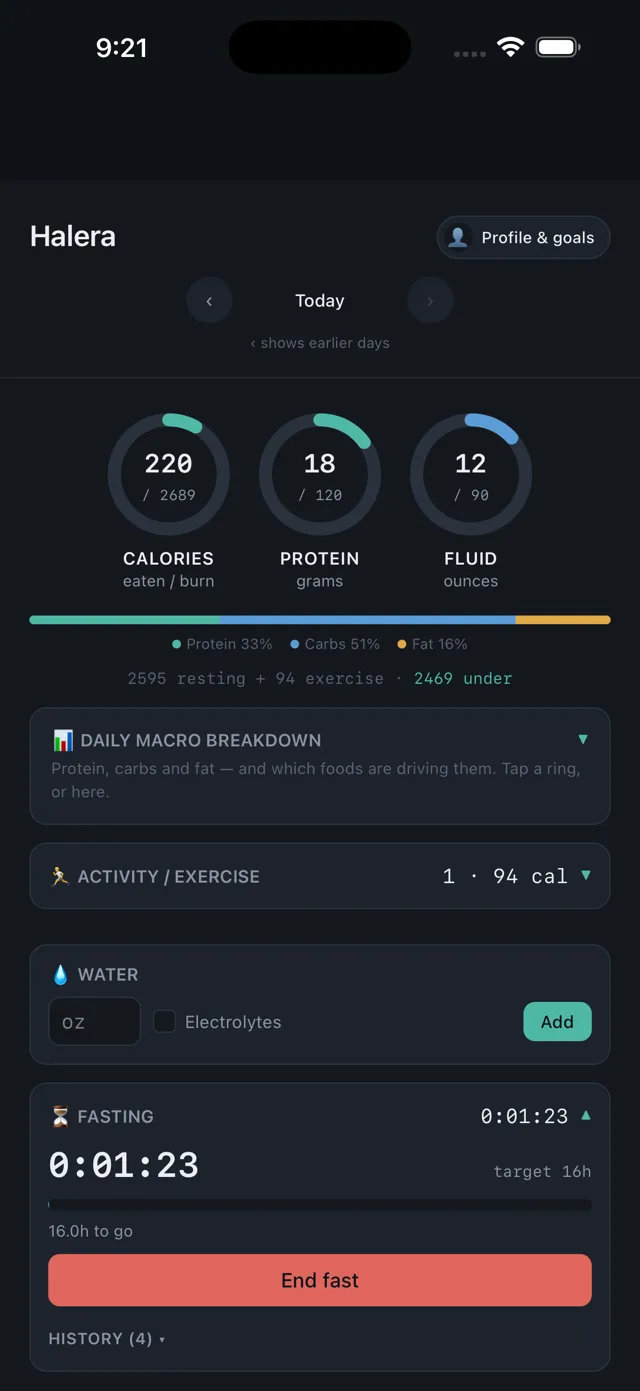
Fasting and food, in the same place
Most people who fast end up with a timer in one app and a food log in another. Halera keeps them together, so one tap starts the fast and the same screen shows what you ate once it's over.
Pick a window
Choose 16:8, 18:6, 20:4, OMAD (23 hours) or a window of your own, and tap Start. The timer runs live and shows how long is left.
Log food when you eat
Type what you ate, scan a barcode, or snap a photo for an AI estimate. You check the numbers before anything is saved.
See it together
The fasting timer sits on the same daily screen as your calorie, protein and fluid rings and your macro split.
A streak that's counted plainly
Your streak counts consecutive days on which you completed a fast that met its target. Ending a fast early is fine — it just doesn't count toward the streak.
Only what you use
Weight, blood pressure, water, sleep, mood and symptoms are there if you want them. Switch off anything you don't use and it disappears from the daily screen.
Free, with no ads
The fasting timer and every tracker are free. No banners, no sponsored foods, and your log isn't sold.
Free on iPhone and Android
Halera Plus only lifts the monthly cap on photo estimates. Everything on this page works on the free app.