How Halera works
Halera is one daily log for food, calories and macros, fasting, weight, blood pressure, hydration, supplements, sleep, mood and symptoms. Food logging and the calorie and protein rings are always on; every other tracker can be switched off. This page explains each field and how every number is calculated.
What every field is, what to put in it, and how the numbers are worked out.
Halera is one daily log covering food, calories and macros, intermittent fasting, weight, blood pressure, hydration, supplements, sleep, mood and symptoms. Food logging and the calorie and protein rings are always on; every other tracker can be switched off in Profile and goals, so an installation used only as a calorie counter shows nothing else. Food is entered three ways: typed in plain language for an AI estimate, photographed for the same estimate read off the picture, or scanned from a packaged food's barcode.
Calories burned are estimated with the Mifflin-St Jeor equation from height, age, sex and activity level rather than measured. Every number in Halera can be corrected by hand after the fact. The rest of this page explains each tracker in turn: what the field expects, and how the figure it produces is calculated.
Profile & goals · Logging food · AI estimates · Portions · Activity · Rings & burn · Fasting · Weight · Blood pressure · Water · Sleep, mood & symptoms · Folding sections · Apple Health · Export & import
Profile & goals
The button in the top right of the screen, beside the Halera name. Worth filling in first, because several other numbers depend on it.
- Units — imperial (lb, in, oz) or metric (kg, cm, ml). Switching converts what you've already entered; nothing is lost.
- Height, age, sex, activity level — used only to estimate how much you burn in a day. Nothing else reads them.
- Daily goals — protein and fluid targets, and a weight goal. Leave them alone and Halera uses 150g of protein and 90oz of fluid.
- Default electrolyte sodium — how much sodium one serving of your electrolyte mix contains. When you tick "Electrolytes" while logging water, this amount is added to your sodium for the day. Most mixes are 200–300mg.
- BMI — worked out from your height and your most recent logged weight. It's shown here rather than on your daily screen, and it's a rough screen only: it can't tell muscle from fat. The categories are the CDC's.
- Track what matters to you — switch off anything you don't want to see. Food logging and the rings always stay on.
- Sign out — at the bottom, with the account controls, along with deleting your account and everything in it.
Logging food and drink
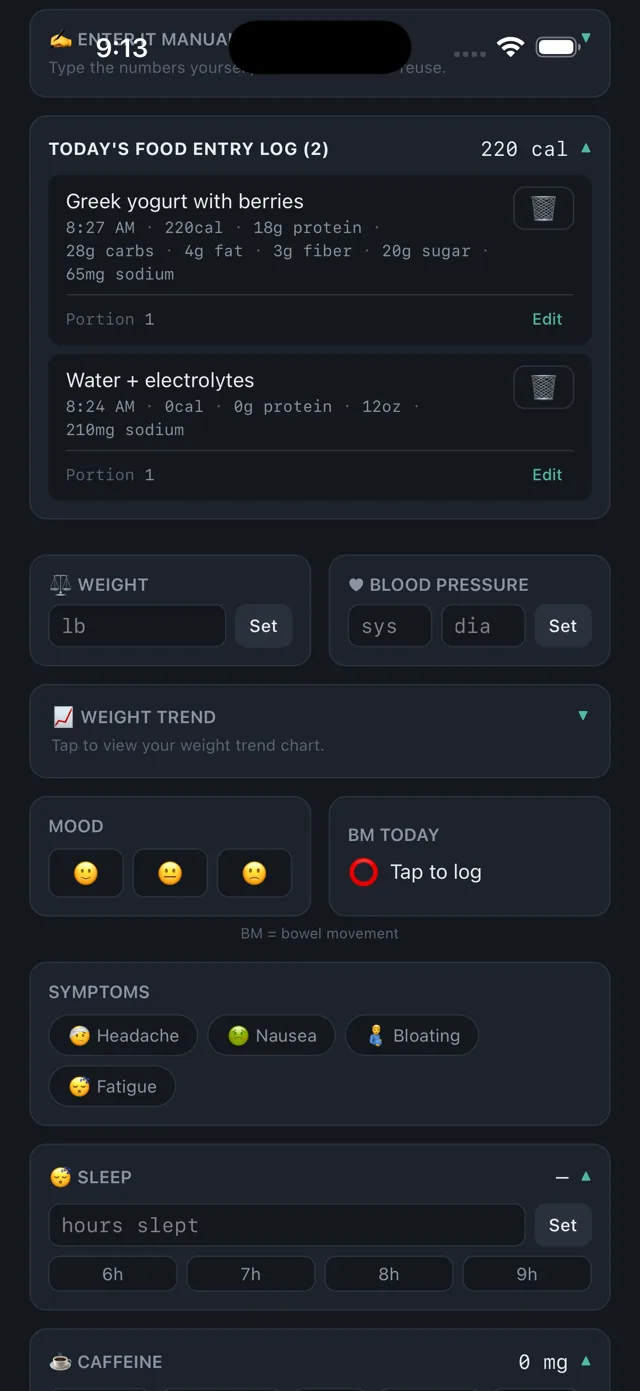
Three ways in, and you can mix them freely:
- Type it. Write what you ate in normal words — "grande oat latte", "two eggs and toast" — and Halera gives you the numbers to check before saving.
- Photograph it. Snap the plate, or the nutrition label on a packet. Reading a label is more accurate than guessing at a plate.
- Enter it yourself. Every field is editable. If you know the numbers, type them.
Whatever you use, the numbers appear for you to review and adjust before anything is saved. Nothing is logged behind your back.
Saved a meal you eat often? Save it as a favourite and it comes back with one tap — and you can edit both its name and its numbers later.
AI estimates, and how much to trust them
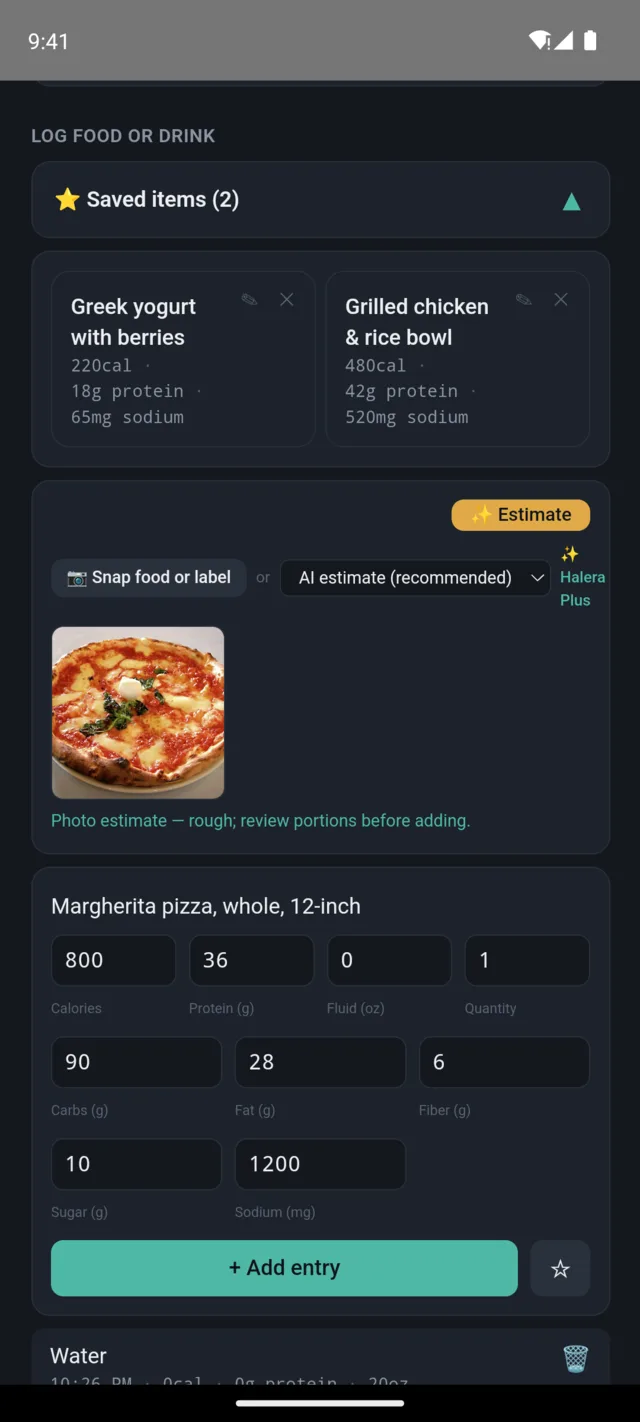
Typed estimates are unlimited and free. Photo estimates cost real money to run, so the free app includes 8 a month; Halera Plus makes them unlimited.
There's also a USDA mode, which looks the food up in the U.S. Department of Agriculture's database and returns the label rather than an estimate. It's exact when it finds a match, and tells you plainly when it doesn't.
Estimates are estimates. They're close enough to be useful for a calorie deficit, and you always see the number before it saves — but if you're weighing everything to the gram, use the USDA lookup or enter the numbers yourself.
Portions
Didn't finish it? Had two? Every entry has a portion — ¼, ½, ¾, 1, 1½ or 2 — shown at the bottom of its card with an edit button. Change it any time and every number for that entry scales with it. Log the full thing, then say how much of it you actually ate.
Logging activity
Pick the activity, then choose how you want to describe it — Time, Distance, or Calories.
- Time — how long you did it for. Halera works out the calories from the activity's intensity and your most recent weight.
- Distance — how far you went. Offered for walking, brisk walking and running, where distance is a genuine guide to the work done. Halera assumes a normal pace, and tells you which pace it assumed, so if yours was very different you can switch to Time instead.
- Calories — if your watch or machine already told you the number, just type it. Duration is optional here.
Distance isn't offered for cycling or swimming on purpose. How hard you work over a given distance changes enormously with speed and conditions, so a distance-only figure would look precise and be wrong. Those stay on Time.
For anything not in the list, choose Other / Estimate, describe the workout in your own words, and Halera will estimate it — or type the calories yourself.
The rings, and what you burn
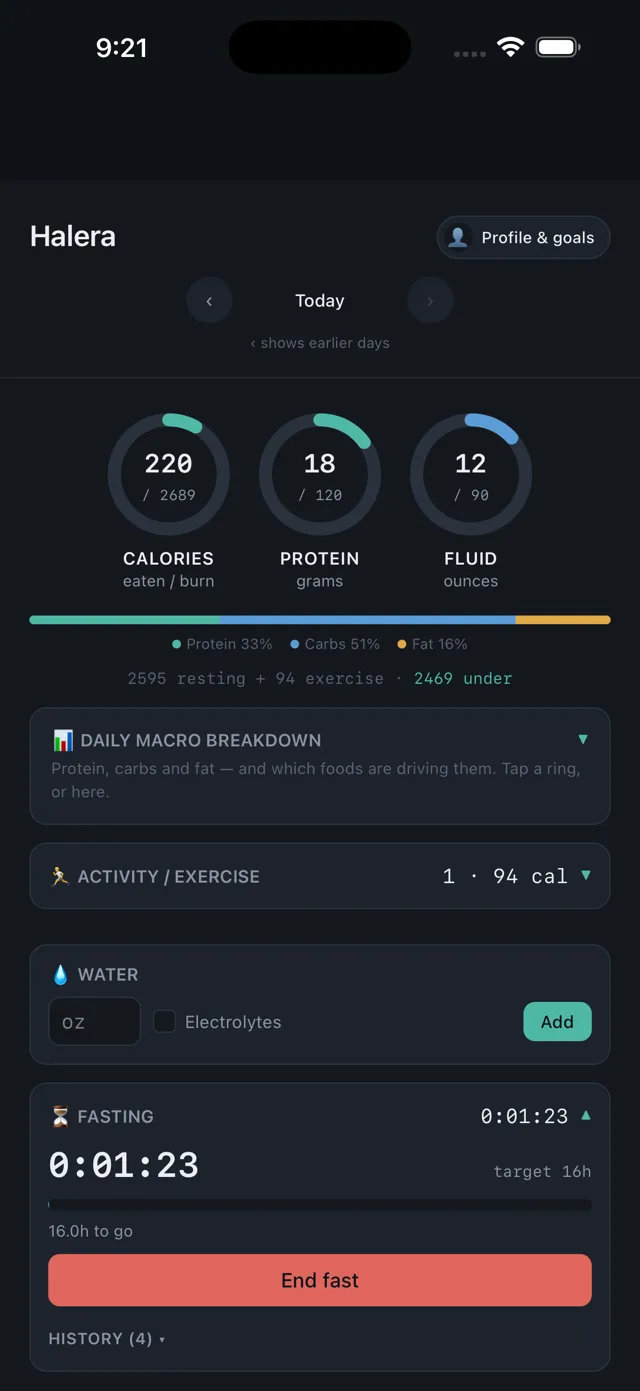
Three rings: calories, protein and fluid. Protein and fluid fill towards the daily goals you set. Calories fills towards what you burn in a day rather than a goal you typed — it turns amber once you go past it.
Under them, a thin bar splits what you've eaten into protein, carbs and fat by share of calories. Tap any ring, or the bar's panel below, to open the full breakdown.
The line beneath reads something like "2,595 resting + 94 exercise · 1,200 under". The resting figure comes from your height, age, sex and most recent logged weight, multiplied by your activity level; the exercise part is whatever you've logged under Activity. The last number is the gap between that and what you've eaten. It uses your latest weight automatically, so it moves as you log.
If you haven't filled in your profile there's no way to work any of that out, so you'll see two rings and a prompt to set it up instead.
It's a formula, not a measurement — the Mifflin-St Jeor equation, the same one most trackers use. Treat it as a reasonable starting point and adjust based on what actually happens to your weight over a few weeks.
Intermittent fasting
Pick 16:8, 18:6, 20:4, OMAD (23 hours) or a window of your own, and tap Start. The timer runs live and tells you how long is left.
Your streak counts back from today: consecutive days on which you completed a fast that met its target. Miss a day and it resets. Ending a fast early is fine — it just doesn't count toward the streak.
Weight
Log it whenever you like — daily, weekly, or when you remember. Halera draws a trend line rather than fixating on today's number, because day-to-day weight moves with water and food more than anything else.
Your most recent entry is what the burn estimate and your BMI use.
Blood pressure
Systolic and diastolic, logged over time. Useful if someone has asked you to keep an eye on it — you can hand over a record instead of a guess.
Halera doesn't interpret the numbers or tell you whether they're good. It isn't a medical device and doesn't give medical advice; that conversation is your doctor's.
Water and hydration
Log fluid toward your daily goal. Tick Electrolytes and Halera adds the sodium figure from your profile at the same time, so you don't have to log it separately.
Drinks you log as food count toward fluid too — a latte is both calories and fluid, and Halera works that out from what you typed.
Sleep, mood, symptoms, caffeine, alcohol and BM
Quick daily check-ins, all optional and all switchable off. The point of having them in the same log as your food is correlation: the day you felt awful sits next to what you actually ate and how you slept.
Halera doesn't analyse these for you or draw conclusions. It records them so you can.
Connecting Apple Health or Health Connect
At the bottom of Profile & goals you can connect Halera to Apple Health on iPhone or Health Connect on Android, so things your phone already recorded don’t have to be typed in twice.
It brings in three things, and only if you allow each one:
- Workouts — they become activity entries, with the duration, distance and calories your phone recorded, and they count toward your est. burn.
- Weight — the most recent reading for each day, so a smart scale keeps your weight and BMI current on its own.
- Height — only if you haven’t already entered one. Halera won’t overwrite a number you typed.
Sleep and blood pressure aren’t available through either platform’s connection, so those stay manual. Steps aren’t brought in either, on purpose: a run you logged also produces steps for the same stretch of time, and counting both would inflate what you appear to have burned.
Halera only reads. It never writes anything back to Apple Health or Health Connect, and nothing you log in Halera is sent to Apple or Google.
It syncs on its own. Once connected, Halera pulls in the last week each time you open the app, and again when you come back to it after a while. You don’t have to do anything. Sync now is still there in Profile & goals if you want to force it — after a workout you’ve just finished, say. Syncing twice is safe: anything already imported is recognised and skipped rather than added again.
Next to that button is the date of the last successful sync. If it goes amber and starts saying how long ago it was, syncing has been failing quietly — almost always because permission was withdrawn in Apple Health or Health Connect. Tap Sync now to see the reason.
Changing your mind. Disconnecting in Halera stops anything further being read; what’s already in your log stays until you delete it. To change which data types are shared, you have to do it where the permissions live — on iPhone that’s Settings › Apps › Health › Data Access & Devices › Halera, and on Android it’s the Health Connect app (there’s a link straight to it in Halera). Reconnecting won’t re-ask: both platforms only show that permission screen once.
Folding sections away
Six sections fold shut if you don’t want them taking up room: your food entry log, activity, fasting, sleep, caffeine and alcohol. Tap the header to fold or unfold one.
Folding never hides the number. The header keeps showing it — "☕ Caffeine · 190 mg", "⌛ Fasting · 14:22" — so a folded section still answers the question you’d have opened it to ask. Only the buttons and boxes go away.
Activity, sleep, caffeine and alcohol start folded, because a single figure is usually all you want from them. Your food log and the fasting timer start open. Whatever you choose is remembered on that device — your phone and your tablet can differ, which is deliberate.
This is different from switching a section off in Track what matters to you. Switching off means you don’t track that thing at all and it disappears from the screen; folding means you still track it, you’re just not looking at it right now.
One thing worth knowing: if you log food while your food entry log is folded, it opens itself, so you can see what you just added.
Getting your data out — and in
At the bottom of the screen, Export copies your log to the clipboard as a spreadsheet, for today, 7 days, 30 days or all time. Paste it into a spreadsheet, or into an AI chat if you want something to look for patterns.
Import goes the other way: paste a spreadsheet or pick a CSV file and Halera reads it back in. It handles all three kinds of row — food, activity, and the daily figures like weight, sleep, mood and blood pressure — so an export can be imported again unchanged. A single section pasted on its own works too, which is what you get when you copy a block out of a spreadsheet or ask an AI chat to make you one.
Food needs a name and a calories column; activity needs a name and calories burned. Dates, times, macros and distances are used when they're there. You see exactly what will be added — and anything it couldn't read, with the reason — before anything is saved. One thing worth knowing: food and activity rows are added to whatever those days already hold, but the daily figures replace them, because a day has one weight, not a list.
You can also delete your account and every piece of data from the bottom of Profile & goals, with no email required.
Still stuck?
Email support@gethalera.com — it reaches Lee, who builds Halera, directly. If something in this guide is wrong or unclear, that's worth an email too.
Halera is for personal wellness tracking only. It is not a medical device and does not provide medical advice. Consult a healthcare professional for any medical concern.